Category Archives: pokemon

How to check EVs and IVs in Pokemon Legends Z-A

EVs and IVs in Pokémon Legends Z-A: How to Check Them In-Game

EVs and IVs in Pokémon Legends Z-A stand for Effort Values and Individual Values. These are important stats that dynamically affect your Pokémon’s overall performance. While EVs are relatively easier to check and increase, IVs present more of a challenge because they are innate values assigned to your Pokémon upon capture or hatching.

What Are EVs and IVs?

Effort Values (EVs) are points gained through activities such as battling other Pokémon and using certain items. They help boost specific stats as your Pokémon levels up. EVs are flexible and can be increased as you progress through the game.

Individual Values (IVs) are hidden stats unique to each Pokémon. They influence the potential maximum stats at level cap and cannot be changed by normal gameplay means. Because IVs are assigned at the time of catching or hatching the Pokémon, improving them requires special methods.

How to Check EVs in Pokémon Legends Z-A

Checking EVs in the game is straightforward:

  1. Open the in-game Menu.
  2. Select the Pokémon whose EVs you want to inspect.
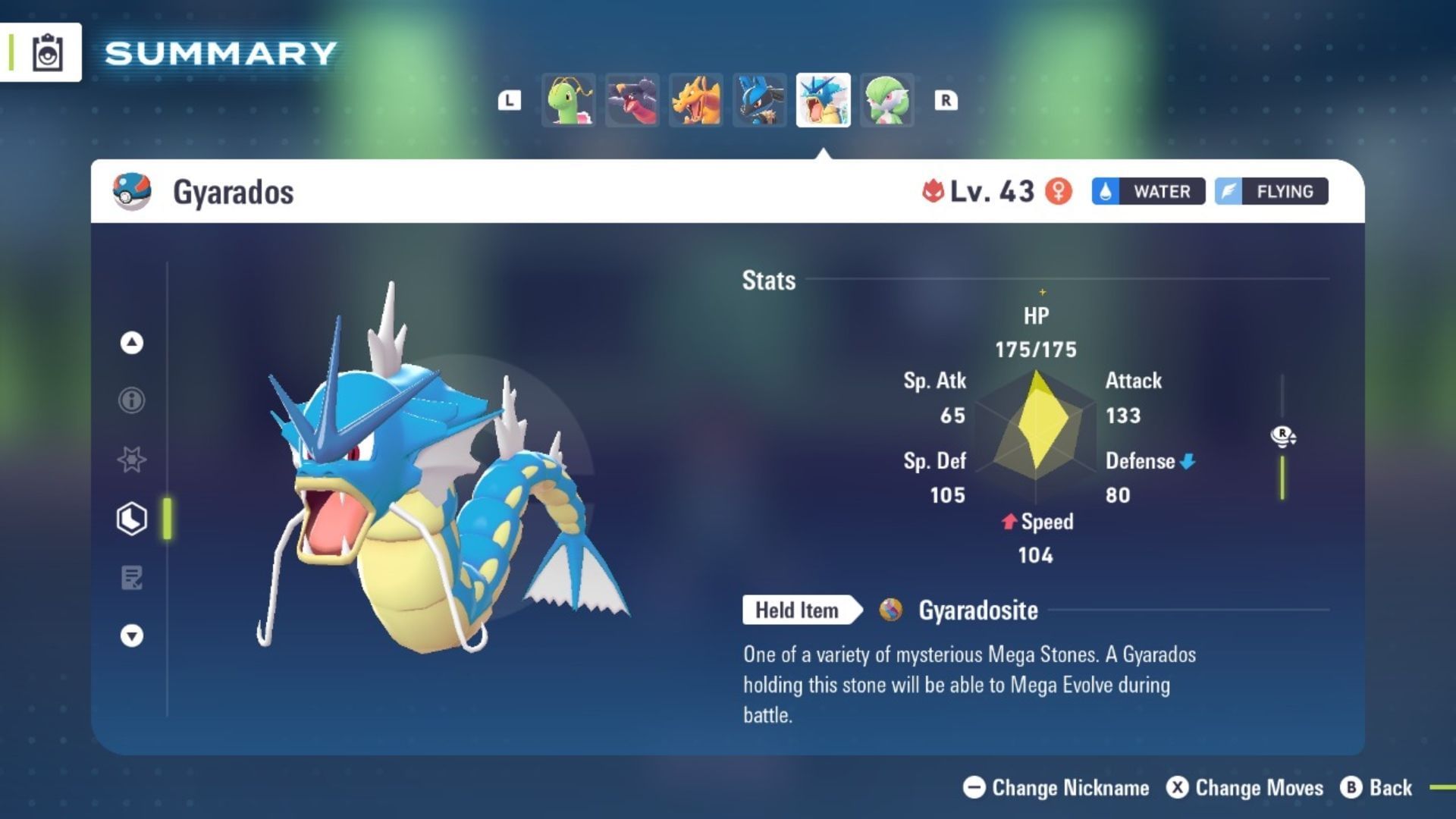
  3. Go to the Pokémon’s tab and choose Check Summary.
  4. Press the L button on your Nintendo Switch or Switch 2 to reveal detailed stats, including EVs.

Since EVs accumulate as your Pokémon battles opponents or uses specific items like vitamins, monitoring them this way helps you plan how to improve your Pokémon effectively.

How to Check IVs in Pokémon Legends Z-A

Unlike EVs, IVs are more difficult to access and improve. To check IVs, you need to unlock the Judge function, which only becomes available after completing the main story campaign of Pokémon Legends Z-A.

Once unlocked, the Judge function allows you to view your Pokémon’s IVs and assess their strengths. Additionally, you can use the Hypertrain feature to boost IVs where needed, but this process is time-consuming and cannot be skipped.

Because checking and increasing IVs requires finishing the main storyline, it’s recommended to focus on progressing through the game to unlock these features.

Tips for Increasing EVs and IVs

Both EVs and IVs remain key components in shaping your Pokémon’s battle capabilities. To efficiently improve these stats:

  • Battle frequently to earn EV points.
  • Use EV-boosting items such as vitamins to speed up EV gains.
  • Complete the main story to unlock the Judge function for IV evaluation.
  • Utilize Hypertrain to enhance IVs after unlocking the feature.

By combining these strategies, you can maximize your Pokémon’s potential as you advance in Pokémon Legends Z-A.

Explore More Pokémon Legends Z-A Guides

For additional tips and insights, check out more articles from Sportskeeda:

https://www.sportskeeda.com/pokemon/how-check-evs-ivs-pokemon-legends-z-a

How to get Mystery Gifts in Pokemon Legends: Z-A

A new Pokémon game means Mystery Gifts, and Pokémon Legends: Arceus already has some available for eager players. There is a neat present available for players who purchase the game within the first few months of its release, so don’t miss out!

### How to Get Mystery Gifts in Pokémon Legends: Arceus

To claim your Mystery Gifts, you’ll need to progress in the game until just after your first battle in the tournament against Zach. When that battle is over, you will return to the hotel. After a few conversations, you can open your main menu by pressing the **X** button.

Next, navigate to **Link Play**, then select the **Mystery Gift** tab on the right side of the screen. Here, you’ll be able to access any available gifts.

### Additional Mystery Gifts

Depending on your purchase, you may have other gifts available as well. These can vary by region and store promotions. For example, digital buyers should have received a code for free Poké Balls at the time of purchase.

Additionally, owners of the Mega Dimension DLC will receive some extra free gifts. Be sure to check your Mystery Gifts tab regularly to catch all available surprises!
https://www.shacknews.com/article/146384/how-to-get-mystery-gifts-pokemon-legends-za

How to Evolve Clefairy in Pokemon Legends Z-A?

Pokemon Legends Z-A has brought back plenty of great Pokemon, including the Clefable line. Because of this, many are wondering how they can even get a Clefable. Here is How to Evolve Clefairy in Pokemon Legends Z-A. Quick links: Main Page · All Pokemon Legends Z-A Guides · All Pokemon Legends Z-A Wild Zone Guides · Evolve Clefairy in Pokemon Legends Z-A There is only one way to Evolve Clefairy into Clefable in Pokemon Legends Z-A, a Moon Stone. As of now, we know of two different locations where you can find Moon Stones in Pokemon Legends Z-A. You can see them both on the map below. Where to find Moon Stones in Pokemon Legends Z-A You are also able to find one at the Stone Emporium, which is right next to Wild Zone 12 and Northwest of Wild Zone 1. But you are unable to get it at the Emporium until after Main Mission 39, which is in the post-game. Read More: How to Evolve Haunter in Pokemon Legends Z-A? Where to Find Cleffa, Clefairy & Clefable in Pokemon Legends Z-A Surprisingly, finding Clefairy and Clefable in Pokemon Legends Z-A is much harder than you might think. Luckily, you can find Cleffa in a multitude of spots. It is available in Wild Zone 19, Bleu District, Jaune District, Magenta District, Rouge District, Vert District. The unfortunate part of that you have to evolve it through upping its friendship still. As for Clefairy, you can also find it in Wild Zone 19 but at a very high level. Clefable is in Wild Zone 20 but only as a very strong Alpha Pokemon at level 63 or 64. Stay Connected You can read more pieces like “Evolve Clefairy Pokemon Legends Z-A” and ‘ for more sports and esports articles from other great TGH writers along with Robert!.
https://thegamehaus.com/pokemon-legends-z-a/how-to-evolve-clefairy-in-pokemon-legends-z-a/2025/10/16/